

| Previous | Home | Next |
In this example we are going to draw Ellipses and Circles. The Ellipses and Circles can be drawn with drawOval() and fillOval(). In this we are using Graphics class and Applet class.
void drawOval( int top, int left, int width, int height ): This method is used to draw Ellipses and Circle.
void fillOval( int top, int left, int width, int height): This method is used to draw and fill Ellipses and circles.
Here drawOval(); and filliOval(): Use to create Ellipses and Circles. The Ellipses are drawn within a bounding rectangle whose upper-left corner of Rectangles are denoted by top,left and the other dimensions are denoted by height and width.
First we are importing two packages. Then after we have write applet tag into comments. In this tag we have pass three arguments code ,height and width. The code attribute is used to call the applet class. And Height , width is used for Sizing the window.
Then we have create a class and extends this class with Applet Class to accurse the property of applet. We had override paint method of applet class. Then we pass the value of upper left corner to set initial point ( int left, int top) and then pass the other dimension height and width (int height, int width).
Example
//Draw Ellipses AND Circle
import java.awt.*;
import java.applet.*;
/*
<applet code="Ellipses" width=300 height=300>
</applet>
*/
public class Ellipses extends Applet
{
public void paint(Graphics g)
{
g.drawOval(0,0,40,40);
g.fillOval(50,50,50,50);
g.fillOval(110,110,50,70);
g.drawOval(00,60,50,70);
}
}
Output Of Example:
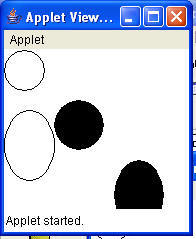
Download Source Code
| Previous | Home | Next |