

R4R provide basic XHTML Tutorials concept with XHTML Examples .Through R4R you can develop XHTML programming concept. R4R provide XHTML Interview Questions with answers.R4R provide XHTML Languages study materials in easy way.
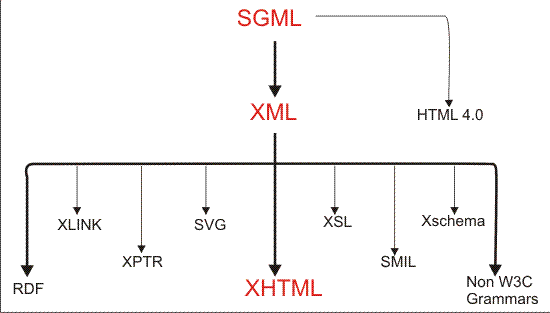
XHTML stands for extensible HyperText Markup Language and is a cross between HTML and XML. XHTML was developed by the W3C to help web developers make the transition from HTML to XML.
- To create a stricter standard for making web pages, reducing incompatibilities between browsers.
- To create a standard that can be used on a variety of different devices without changes.
There are several main changes in XHTML from HTML
- All tags must be in lower case
- All documents must have a doctype
- All documents must be properly formed
- All tags must be closed
- All attributes must be added properly
- The name attribute has changed
- Attributes cannot be shortened
- All tags must be properly nested
HTML was originally Developed by Tim Berners-Lee, now director of the World Wide Web Consortium, keepers and communicators of most internet standards. XHTML1 is a reformulation of HTML4, which was SGML-based, as XML. The changes are of a mere syntactic nature and not visible to the end-user.
XHTML1 comes in three different flavors:
| XHTML | HTML |
| XHTML is case-sensitive | HTML is not case-sensitive |
| XHTML, being XML, must be well-formed. Every element must have an end tag, or use the self-closing tag syntax | HTML allows some end tags and even some start tags to be omitted. |
| All attributes must have a value in XHTML | HTML allows some attributes (e.g., selected) to be minimised. |
| All attribute values must be surrounded by double or single quotes | HTML allows quotes to be omitted if the value contains only alphanumeric characters (and some others). |
| XHTML allows the use of CDATA sections | HTML does not |
| In XHTML, non-empty elements require both a start and an end tag | In HTML, certain elements allow the omission of either or both |
| XHTML allows the use of processing instructions | HTML does not |
| In XHTML, tag names and attribute names are case sensitive | In HTML, they are case insensitive. |
| XHTML uses XML parsing requirements | HTML uses its own which are defined much more closely to the way browsers actually handle HTML today. |
We use XHTML because of some important reasons those are given below
- It is the first step toward a modular and extensible web based on XML.
- It provides the bridge for web designers to enter the web of the future, while still being able to maintain compatibility with today's HTML 4 browsers.
- Develop sophisticated behaviours that work across multiple browsers and platforms.
- Comply with accessibility laws and guidelines without sacrificing beauty, performance, or sophistication.
- Redesign in hours instead of days or weeks, reducing costs.
- It can be used by mobile devices.
- It is possible to use XML tools with it.