


ASP.NET is the next generation ASP, but it's not an upgraded version of ASP. ASP.NET is an entirely new technology for server-side scripting. ASP.NET is a part of the Microsoft .NET framework, and a powerful tool for creating dynamic and interactive web pages. ASP.NET is a server side scripting technology that enables scripts (embedded in web pages) to be executed by an Internet server.
- ASP.NET is a Microsoft Technology.
- ASP stands for Active Server Pages
- ASP.NET is a program that runs inside IIS.
- IIS (Internet Information Services) is Microsoft's Internet server.
- IIS comes as a free component with Windows servers.
- IIS is also a part of Windows 2000 and XP Professional.
Learn ASP.Net Stepwise
ASP.NET Basic Tutorials (Example)
Ajax with ASP.NET Basic Tutorials (Example)
- ASP.NET is a much improved replacement for original ASP framework
- All ASP.NET code is fully compiled prior to execution.
- ASP.NET doesn't require the use of scripting languages.
- ASP.NET allows for total separation of code from HTML.
- ASP.NET state management works in a Web farm environment.

| PreInit | Use this event for the following:
|
| Init | Use this event to read or initialize control properties |
| InitComplete | Use this event for processing tasks that require all initialization be complete. |
| PreLoad | Use this event if you need to perform processing on your page or control before the Load event. After the Page raises this event, it loads view state for itself and all controls, and then processes any postback data included with the Request instance. |
| Load | The Page calls the OnLoad event method on the Page, then recursively does the same for each child control, which does the same for each of its child controls until the page and all controls are loaded. |
| LoadComplete | Use this event for tasks that require that all other controls on the page be loaded. |
| Page_PreRender | The application is about to render the page object. |
| Page_Unload | The page is unloaded from memory. |
| Page_Disposed | The page object is released from memory. This is the last event in the life of a page object |
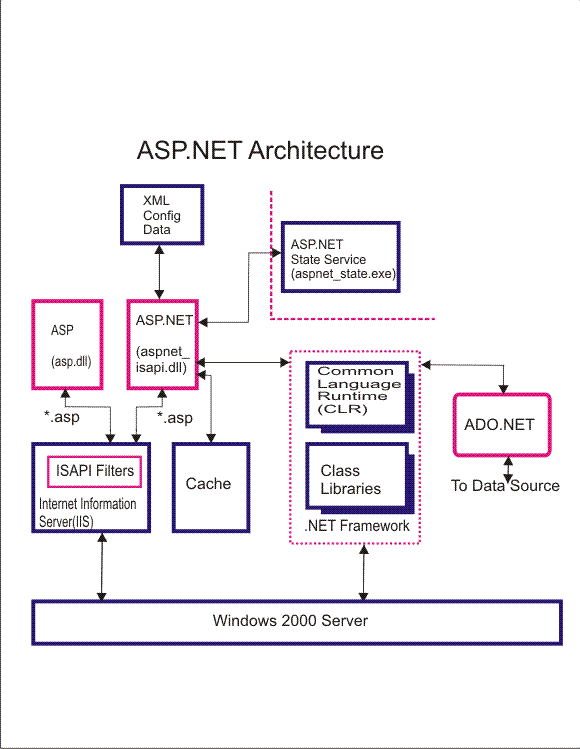
In Above Figure
The configuration of ASP.NET is managed by information stored in XML-format in a configuration file (Web.Config). The cache allows for improved performance of ASP.NET, as the most commonly requested pages would be served from the ASP.NET cache.State management services for ASP.NET are provided by the ASP.NET state service. The .NET Framework provides the Common Language Runtime (CLR) , which compiles and manages the execution of ASP.NET code, and the class libraries, which offer prebuilt programmatic functionality for Web Forms, XML support, and exception handling. ADO.NET provides ASP.NET with connections to databases.
- Easy-to-use, graphical data mapping interface
- Instant data transformation
- XSLT 1.0/2.0 and XQuery code generation
- Java, C#, and C++ code generation
- Advanced data processing functions
- Support for all major relational databases including SQL Server, IBM DB2, Oracle, and more
- Integration with Altova StyleVision for report rendering
- Visual Studio & Eclipse integration
- Available in 32-bit and 64-bit versions
Some of the new features in ASP.NET 2.0 are
- Master Pages, Themes, and Web Parts
- Standard controls for navigation
- Standard controls for security
- Roles, personalization, and internationalization services
- Improved and simplified data access controls
- Full support for XML standards like, XHTML, XML, and WSDL
- Improved compilation and deployment (installation)
- Improved site management
- New and improved development tools
- ASP.NET AJAX.
- New ListView and DataPager Controls.
- WCF Support for RSS, JSON, POX and Partial Trust.
- LINQ (Language Integrated And Query).
- New Web Design Interface.
- Multi-targeting Support.
- System.Core.dll - Includes the implementation for LINQ to Objects
- System.Data.Linq.dll - Includes the implementation for LINQ to SQL
- System.Xml.Linq.dll - Includes the implementation for LINQ to XML
- System.Data.DataSetExtensions.dll - Includes the implementation for LINQ to DataSet
- System.Web.Extensions.dll: Includes the implementation for ASP.NET AJAX (new enhancements added) and new web controls as explained earlier.
- ASP.NET drastically reduces the amount of code required to build large applications.
- With built-in Windows authentication and per-application configuration, your applications are safe and secured.
- It provides better performance by taking advantage of early binding, just-in-time compilation, native optimization, and caching services right out of the box.
- The ASP.NET framework is complemented by a rich toolbox and designer in the Visual Studio integrated development environment. WYSIWYG editing, drag-and-drop server controls, and automatic deployment are just a few of the features this powerful tool provides.
- Provides simplicity as ASP.NET makes it easy to perform common tasks, from simple form submission and client authentication to deployment and site configuration.